
Automatic product sheet updates: how to manage consistent data across every channel
From technical data to publication, a PIM helps reduce repetitive tasks and manage changes across websites, e-commerce platforms and catalogues
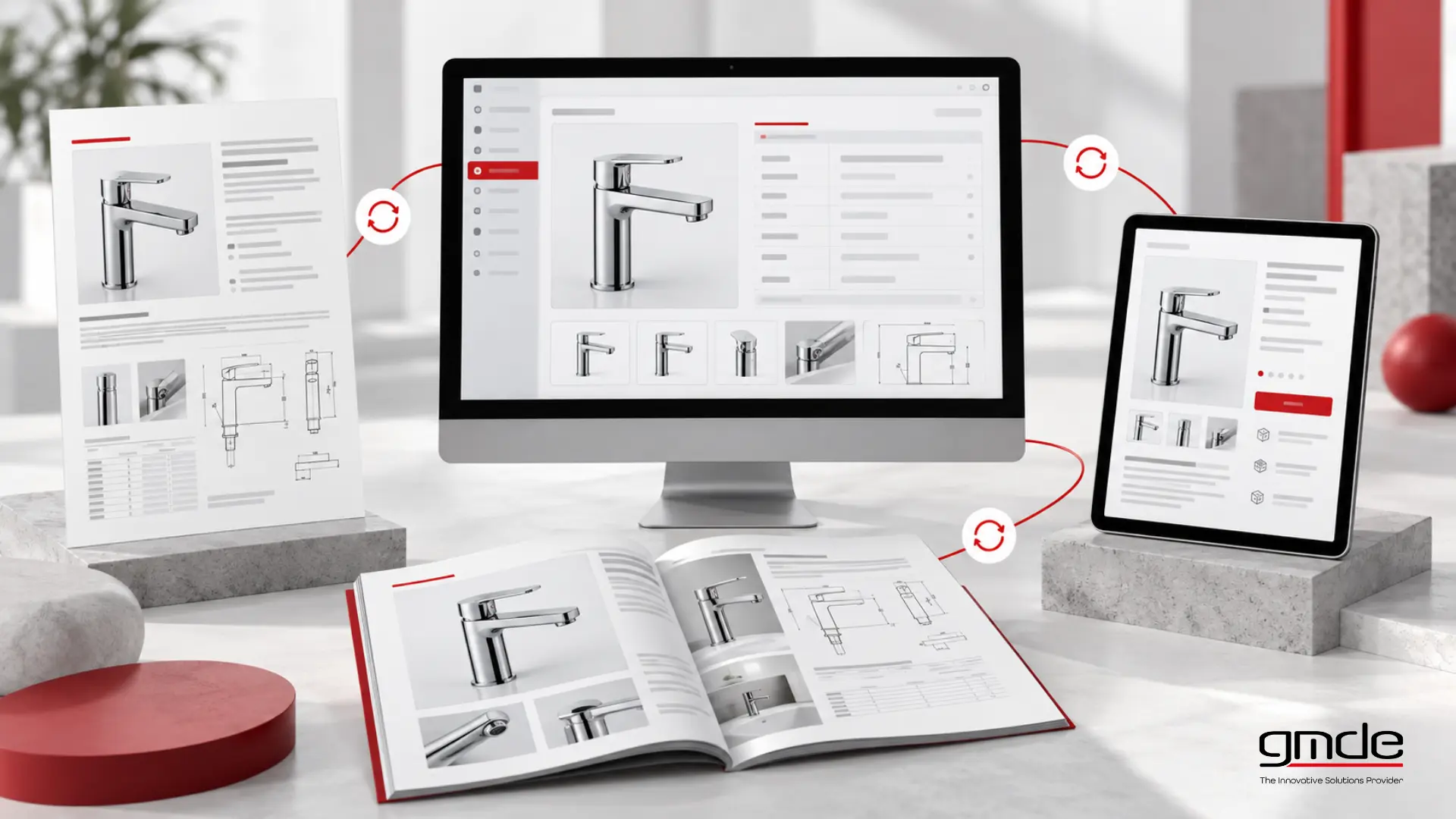
When information is spread across different systems and documents, a seemingly simple change requires multiple manual steps. Finding every copy, notifying colleagues and checking each destination becomes part of everyday work. As the number of products, variants and languages increases, this process becomes increasingly difficult to control.
Automatic product sheet updates allow changes to be managed through defined workflows, using centralised, approved data. A PIM (Product Information Management) system can serve as the link between business information and the channels that use it.
To achieve the best results, integrations with existing systems must also be planned, and responsibilities and publishing rules must be established.
What does it mean to update product sheets automatically?
Automation means setting up a process in which information is collected, checked and transferred to the intended channels, reducing the need to copy it manually.
A product sheet often includes data from different departments. For example, product codes and master data may come from the ERP, technical specifications from the product department, product descriptions from marketing, and images from a digital repository. The PIM organises this information within a common structure, linking it to the correct product.
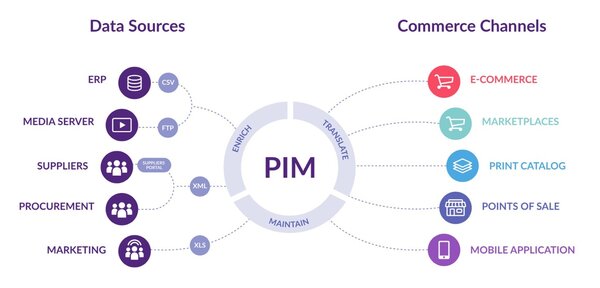
When a data value changes, the system can make it available to connected channels according to the established rules. Automation therefore covers the entire data journey, from source to destination, while the speed of updates depends on the project and the capabilities of the systems involved.
Why manual updates become a problem
The cost of a change goes beyond the time needed to correct a field. It also involves identifying which version is valid, where it is used and who needs to take action.
In a catalogue with numerous variants, the same attribute may appear in dozens of product sheets. If it is managed separately in each document, every correction multiplies the workload and the opportunities for error. Translations add another layer of complexity, as a change to the original text may require a review of local versions.
These issues affect the business: a customer checks a specification on the website, such as a dimension, and finds a different value in the PDF; a distributor receives incomplete information; and a sales representative needs to seek confirmation before responding to an enquiry. These are signs that the process needs to be reviewed, particularly when updating just a few products involves several people and there is no clear way to verify completion.
How product sheet updates work with a PIM
Define the source of each piece of information
The first step is to establish where each piece of data originates and which system controls changes to it. For example, a product code managed in the ERP should be distinguished from an e-commerce description maintained in the PIM. This division prevents imports from overwriting previously approved content or two systems from updating the same field with different values.
For pricing and availability, the update workflow should be defined by considering how frequently values change and the company’s system architecture, including the option of transferring this information directly from the ERP to the sales channel.
Organise attributes, families and variants
A shared structure makes it possible to manage dimensions, materials, units of measurement, compatibility and product relationships consistently, organising information according to the characteristics of different families and variants. Where the data model supports it, common data can be defined at family level and reused across the relevant variants, with any exceptions specified to prevent a characteristic from being applied to products for which it is not valid.
Check data before publication
Validation rules make it possible to check that mandatory attributes are present, numerical values are correct and the required translations are available, while workflows establish who must complete, review and approve the product sheet. Each product then moves through the stages required for publication, according to the requirements of each channel. A product sheet that is complete for the Italian website, for example, may require additional information or translations before it can be published on an international marketplace.
Connect channels and verify data transfers
Through APIs, connectors or structured exports, approved information can be sent to CMS platforms, e-commerce platforms, portals and document production tools. For each destination, a mapping is defined to match PIM fields with the corresponding attributes in the receiving system, in accordance with the required formats and constraints.
To ensure that changes actually reach connected channels, the process must also include checks on transfer results, error notifications and procedures for resolving issues. Updating data in the PIM must therefore be accompanied by verification that the destination system has received and processed it correctly.
PDF technical data sheets, images and multilingual content
Producing up-to-date technical data sheets requires data to be connected to a document generation system and predefined layout templates. Information can then be inserted into the appropriate fields, with different rules for product families and types.
Images also require careful management. Connecting the PIM and DAM helps associate the appropriate assets with each product; distribution rules must establish which files to use and how to replace previous versions.
In multilingual catalogues, a change to the original description may require a new translation and review cycle. The workflow should clearly identify content that needs to be checked, preventing channels from using text that is no longer aligned with the source.
Where to start with automating updates
A project can begin with one product family and one priority channel, selected according to the problem to be solved. It is useful to trace the journey of an actual change, from the initial request to publication, identifying manual steps and points where control is lost.
Before configuring the system, it is necessary to clarify which data is needed, who manages it, which approvals are required and which applications must receive it. Involving the IT department is essential to assess integrations, access permissions and operational management, alongside input from the technical, marketing and sales departments.
The comparison between the initial process and the automated process can be based on concrete indicators:
- Time between approval of a change and publication.
- Number of manual actions per update.
- Percentage of complete product sheets for each channel.
- Synchronisation errors and the time needed to resolve them.
- Inconsistencies identified between online product sheets and documents.
These measurements help assess results within your own catalogue, without relying on promises of savings that are assumed to be the same for every company.
Let’s now look at how Nobili automated technical data sheet updates and catalogue production through its project with GMDE.
The Nobili case: from centralised data to automatically updated technical data sheets
GMDE’s project for Nobili, a leading name in Italian design specialising in technological solutions and taps for bathrooms and kitchens, shows how centralising information can simplify product sheet updates. The company managed its data in two separate systems: one dedicated to catalogue layout and the other to technical specifications and prices. This required frequent manual checks to avoid inconsistencies.
GMDE brought the information together in Pimcore’s PIM, connecting it to digital assets organised in the DAM. Working with Nobili’s IT department, GMDE also defined access permissions and approval workflows suited to the company’s different roles. This foundation enabled the implementation of Web2Print, which automatically updates the relevant technical data sheet whenever product information is changed, without having to manually enter the change in the document.
The project was then extended to catalogue production with Smart InDesign, which connects Pimcore to Adobe InDesign through a plugin and allows data to be imported directly into the layout, reducing repetitive tasks and transcription errors.
FAQ section
Frequently asked questions about automatic product sheet updates
- Does a PIM automatically update every channel?
Updates apply to channels for which integrations have been developed and configured. It is necessary to verify that the destination system can receive the data and define which information to transfer, according to which rules and how frequently. - Can we keep our existing ERP?
Yes, the project can include integration with the existing ERP, following an assessment of its interfaces and data exchange methods. The ERP continues to control the data within its scope, while the PIM organises information intended for communication and sales. - Do updates happen in real time?
This depends on the integrations. Some workflows can be triggered by a change or an approval; others run at scheduled intervals. The frequency should be selected according to operational needs and the systems involved. - Can PDF data sheets also be automated?
Yes, through a document generation system connected to the data and configured templates. The process produces a new version of the document; copies that have already been distributed must be managed through a dedicated update policy. - Automate product sheet updates with GMDE
Reducing repetitive work on product sheets requires a system built around business workflows. GMDE implements a complete ecosystem to centralise information and integrate ERP systems, CMS platforms, e-commerce platforms and automated publishing tools. - How much work does a change to your catalogue currently require?
Start with one product sheet and the channels where it needs to be updated. Speak with one of our experts to assess how to organise data, checks and integrations for your project.